Internal Linking Strategy for SEO (Complete Guide for 2026)
Many website owners spend months trying to improve rankings through backlinks, social media promotion, and expensive SEO tools while ignoring one of the most powerful techniques already available on their own websites: internal linking.
Internal linking is often underestimated because it looks simple. However, when used strategically, it can improve rankings, increase page authority, reduce bounce rate, and help search engines understand your website structure better.
If you look at large websites that dominate search results, you will notice something interesting: they rarely publish isolated content. Instead, their articles connect with each other in a logical structure. That structure creates topical authority and helps users move naturally from one topic to another.
According to Google Search documentation, links help Google discover pages and understand relationships between content.
In this complete guide, you will learn how internal linking works, why it matters, and how beginners can build a powerful internal linking strategy in 2026.
📌 What is Internal Linking?
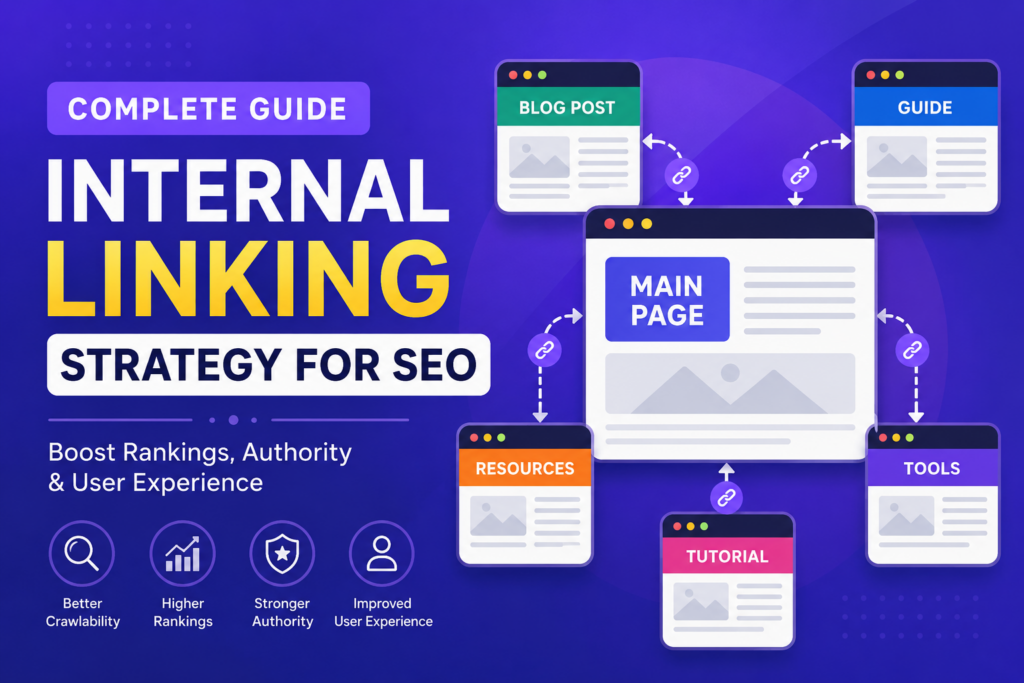
Internal linking means linking one page of your website to another page within the same website.
For example, if you are writing an article about SEO and you mention keyword research, you can link readers to your detailed article on keyword research.
Unlike backlinks, which come from external websites, internal links are fully under your control.
Think of internal links as roads connecting cities. Without roads, travelers cannot move efficiently. Similarly, without internal links, search engines and users struggle to navigate your content.
🎯 Why Internal Linking Matters for SEO
Search engines discover and understand websites through links. Internal links help search engines identify which pages are important and how content relates to one another.
But internal linking is not only for search engines.
It also improves user experience. When users find helpful related content, they stay longer on your website, visit more pages, and interact more deeply with your content.
These engagement signals indirectly support SEO.
🧠 How Search Engines Use Internal Links
Search engines use links to crawl websites. When Google visits a page, it follows links to discover additional content.
If a page has no internal links pointing to it, Google may struggle to find or prioritize it.
This creates what SEO professionals call an “orphan page” — content that exists but is disconnected from the website structure.
Internal linking prevents this issue by ensuring every important page is connected.
🔍 Internal Linking and Topical Authority
One of the biggest SEO trends in recent years is topical authority.
Search engines increasingly reward websites that cover a topic comprehensively instead of publishing isolated articles.
For example, if your website publishes articles about WordPress, Google expects related content such as:
WordPress SEO, website speed, plugins, security, hosting, troubleshooting, and migration.
When these articles link together naturally, they create a content ecosystem.
This signals expertise and strengthens EEAT (Experience, Expertise, Authoritativeness, and Trustworthiness).
📊 Benefits of Internal Linking
Improves Crawlability
Internal links help search engines discover pages quickly.
Instead of relying only on XML sitemaps, Google can follow links to navigate your website.
Distributes Link Equity
Pages with stronger authority can pass value to newer pages through internal links.
This helps important pages gain visibility faster.
Reduces Bounce Rate
When users find relevant links inside your content, they explore more pages instead of leaving immediately.
This increases session duration and improves engagement.
Improves User Experience
Users appreciate content recommendations that genuinely help them.
If someone reads about website speed and sees a related article about SEO optimization, it creates a smoother experience.
⚡ Types of Internal Links
Navigational Links
These are links found in menus, headers, and navigation areas.
They help users move between major sections.
Contextual Links
These appear naturally within article content.
Contextual links are often the most powerful because they provide relevant recommendations based on user intent.
Footer Links
Footer links appear at the bottom of pages and usually connect important sections.
Sidebar Links
These are commonly used for recent posts or related content recommendations.
📈 Best Practices for Internal Linking
Use Natural Anchor Text
Anchor text is the clickable text inside a link.
Instead of writing generic text like “click here,” use descriptive phrases.
For example:
Read our complete guide on keyword research.
This helps both users and search engines understand link context.
Link Relevant Content Only
Do not add links just for the sake of linking.
Every link should add value and match user intent.
Irrelevant links create confusion and reduce trust.
Prioritize Important Pages
Some pages matter more than others.
Pages that generate leads, target competitive keywords, or support your business goals should receive stronger internal link support.
For Preneurs, examples include hosting pages, theme pages, and pillar SEO content.
Avoid Overlinking
Adding too many links can overwhelm users and dilute value.
Focus on quality over quantity.
Strategic links perform better than excessive links.
🤖 Internal Linking and AI Search
Modern search engines increasingly rely on AI systems to understand content relationships.
Internal linking helps AI recognize topic connections and content hierarchy.
As AI-driven search evolves, strong content structures will become even more important.
Learn more from Google Helpful Content guidance.
⚠️ Common Internal Linking Mistakes
Many beginners create internal links randomly.
Others use identical anchor text everywhere or forget to update old content with links to newer articles.
Some websites publish dozens of articles but never connect them together.
This weakens overall SEO performance.
💡 Internal Linking Strategy for Preneurs
Since Preneurs follows a content-cluster approach, internal linking should become part of publishing workflow.
Whenever a new article is published, connect it with at least 3–5 existing articles.
For example:
Keyword Research → On-Page SEO → Technical SEO → Search Console → Analytics
This creates a strong SEO ecosystem rather than isolated content.
❓ FAQs
1. What is internal linking?
Linking one page of your website to another page on the same website.
2. Does internal linking improve SEO?
Yes, significantly.
3. How many internal links should a blog have?
Usually 3–10 relevant links depending on content length.
4. What is anchor text?
The clickable text used for links.
5. Can internal links help indexing?
Yes, they improve crawlability.
6. Should old posts link to new posts?
Yes, absolutely.
7. Is overlinking harmful?
Too many unnecessary links can reduce quality.
8. Are menu links internal links?
Yes.
9. Do internal links pass authority?
Yes, they distribute page value.
10. Is internal linking difficult?
No, but it requires strategy.
Final Thoughts
Internal linking is one of the simplest yet most powerful SEO techniques available. Unlike backlinks or algorithm changes, you have complete control over it.
When done correctly, internal linking improves rankings, strengthens topical authority, and creates a better experience for users.
Do not treat your articles as separate pieces of content. Build a connected ecosystem — because that is how authority is built in 2026.