WordPress Plugins You Should Avoid (Performance & Security Guide for 2026)
One of the reasons WordPress became popular is flexibility. Need contact forms? There is a plugin. Need SEO features? There is a plugin. Need image galleries, backups, security, optimization, analytics, memberships, and almost anything else? There is probably a plugin available.
This flexibility creates power.
It also creates problems.
Many beginners install plugins the same way people download mobile applications. A plugin for every small task feels convenient at first.
Then websites slowly become heavy, unstable, confusing, and difficult to manage.
The problem usually is not WordPress itself.
The problem often becomes plugin choices.
In 2026, website performance and security matter more than ever. Search engines increasingly evaluate user experience while visitors expect fast and reliable websites.
This guide explains plugin mistakes and categories WordPress users should approach carefully.
📌 Important Clarification Before We Start
This article does not claim specific plugins are always bad.
A plugin that works perfectly for one website may create problems for another.
The goal is understanding patterns rather than blindly avoiding names.
Focus on behaviors, quality signals, and website needs.
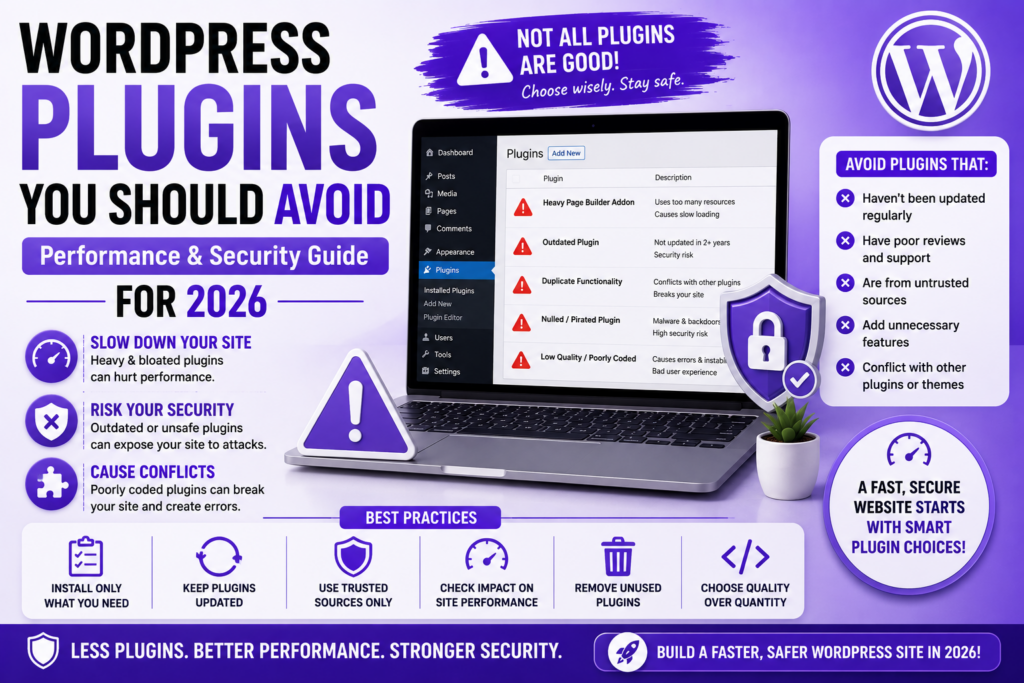
🎯 Problem #1: Installing Multiple Plugins That Do the Same Job
This happens surprisingly often.
Website owners install:
Two SEO plugins.
Several caching plugins.
Multiple security plugins.
Several page optimization tools.
Duplicate functionality creates conflicts and unnecessary overhead.
More tools rarely mean better performance.
Choose one strong solution where possible.
⚡ Problem #2: Heavy Plugins With Features You Never Use
Many plugins include large feature collections.
Initially this sounds useful.
In practice, websites sometimes activate massive plugins while using only one or two features.
This creates unnecessary code loading.
Unnecessary scripts affect performance.
Users frequently overlook this hidden cost.
🚀 Problem #3: Plugins With Poor Update Histories
WordPress evolves continuously.
Plugins that stop receiving updates eventually become risky.
Potential issues include:
Security vulnerabilities.
Compatibility problems.
Performance issues.
PHP conflicts.
Before installing plugins, review:
Update frequency.
User feedback.
Active installations.
Support responsiveness.
Official plugin repository:
🔍 Problem #4: Random Plugins From Untrusted Sources
Many beginners search:
“Download premium plugin free.”
This often creates problems.
Unofficial downloads sometimes include:
Injected code.
Backdoors.
Malware.
Spam scripts.
Security problems frequently begin this way.
Download plugins only from trusted sources.
📈 Problem #5: Excessive Page Builder Add-ons
Page builders provide flexibility.
However, many websites install multiple extension packs simultaneously.
Large numbers of widgets and effects frequently increase page weight.
Some websites unknowingly load dozens of unnecessary assets.
More visual effects do not always improve experiences.
📱 Problem #6: Poorly Built Social Sharing Plugins
Some social plugins create performance issues.
Examples include:
Excessive scripts.
Multiple external requests.
Heavy animations.
Tracking layers.
Website speed sometimes suffers quietly.
Lightweight solutions often work better.
🧠 Problem #7: Plugins Replacing Basic Hosting Functions
Some website owners install plugins attempting to solve hosting limitations.
Examples:
Excessive optimization plugins.
Multiple database tools.
Heavy monitoring systems.
Weak hosting often creates symptoms that plugins cannot truly solve.
Infrastructure matters.
For websites expecting growth, stable hosting becomes important.
🤖 Plugin Decisions in the AI Era
AI recommendations increasingly influence decisions.
However, blindly installing plugins suggested online remains risky.
Evaluate:
Necessity.
Performance impact.
Security reputation.
Long-term maintenance.
Useful tools should solve real problems.
⚠️ Signs a Plugin May Cause Problems
Very poor reviews.
Rare updates.
Performance complaints.
Support inactivity.
Unclear documentation.
Unexpected website behavior.
Many plugin problems become visible gradually rather than immediately.
💡 Practical Advice for Preneurs Readers
Preneurs themes aim to remain lightweight and optimized.
Website owners should continue the same philosophy.
Install plugins intentionally.
Not emotionally.
Every plugin should justify its existence.
Fast websites often result from simplicity rather than complexity.
❓ FAQs
1. Are plugins bad?
No.
2. Can too many plugins slow websites?
Sometimes yes.
3. Should I install multiple SEO plugins?
No.
4. Are free plugins unsafe?
Not necessarily.
5. Should plugins be updated?
Absolutely.
6. Are nulled plugins risky?
Very.
7. Can plugins affect security?
Yes.
8. Does plugin quantity matter?
Quality matters more.
9. Should I delete inactive plugins?
Usually yes.
10. Can hosting affect plugin performance?
Absolutely.
Final Thoughts
WordPress plugins create tremendous flexibility.
However, every installation becomes a decision.
Strong websites are rarely built by installing everything available.
Install less. Choose better.